
Practical Tips for Winter Vlogging: Keeping Batteries Warm and Operational Guide
There is a specific kind of heartbreak every winter creator knows intimately. You drive three hours out to a remote mountain pass. The frost is coating your eyelashes, your breath is pluming in thick white clouds, and the landscape looks like Narnia after a blizzard. You hit record on your camera, full of creative momentum. Exactly forty-two seconds later, the screen flickers once, displays a blinking red battery icon, and the entire rig goes dark. Dead. Game over. I’ve noticed most beginners blame the camera manufacturer when this happens, but here’s the ugly truth: your gear isn’t broken. You just don’t understand how lithium-ion batteries react to the cold.

Shooting in sub-zero weather is an absolute logistical nightmare if you approach it with summer habits. Condensation kills sensors. Frozen LCD screens smear into unreadable blurs. And power cells hemorrhage their charge when exposed to biting wind. But you don’t have to pack it in when the first snow falls. Over the last decade of filming in places where my water bottle turns into a solid cylinder of ice by noon, I’ve picked up a few unconventional tricks to keep my cameras alive when nature tries to freeze them solid. Trust me on this: mastering winter vlogging separates the amateurs from the pros.
- • The Chemistry of Cold: Why Your Battery Dies Fast
- • The Body-Heat Stash and Chemical Warmers
- • Managing Condensation When Stepping Back Inside
- • Operational Tweaks for Extreme Environments
- ↳ Can I use dummy batteries with a power bank in winter?
- ↳ Should I turn my camera off between shots to save battery?
- ↳ How do I keep my microphone from picking up wind noise in a snowstorm?
- ↳ Is it safe to charge cold batteries immediately after a shoot?
Key Takeaways & Quick Overview
AI Verified
- ✔Practical tips for winter vlogging: keeping batteries warm and operational guide there is a specific kind of heartbreak every winter creator knows intimately.
- ✔You drive three hours out to a remote mountain pass.
- ✔The frost is coating your eyelashes, your breath is pluming in thick white clouds, and the landscape looks like narnia after a blizzard.
- ✔You hit record on your camera, full of creative momentum.
The Chemistry of Cold: Why Your Battery Dies Fast
To fix a problem, you have to look at the root cause. Lithium-ion battery physics tell a brutal story. Inside every battery cell, chemical reactions create the electrical current that powers your Sony, Canon, or Panasonic rig. When the ambient temperature plummets, those chemical reactions slow down drastically. The ions simply refuse to move fast enough to meet the current draw of your camera’s sensor and autofocus system.
Your camera reads this slowdown as a depleted charge. It panics and shuts down to protect itself. But here is the kicker: that battery isn’t actually empty. The juice is still trapped inside. If you take that “dead” battery out of your camera, stick it in your pants pocket against your skin for ten minutes, and pop it back in, you’ll often see fifty percent battery life magically return.
Stop leaving your spares loose in an outer backpack pocket where they can freeze solid. That is amateur hour. Instead, treat your power supply like a newborn baby. Keep them close to your body heat at all times.
The Body-Heat Stash and Chemical Warmers
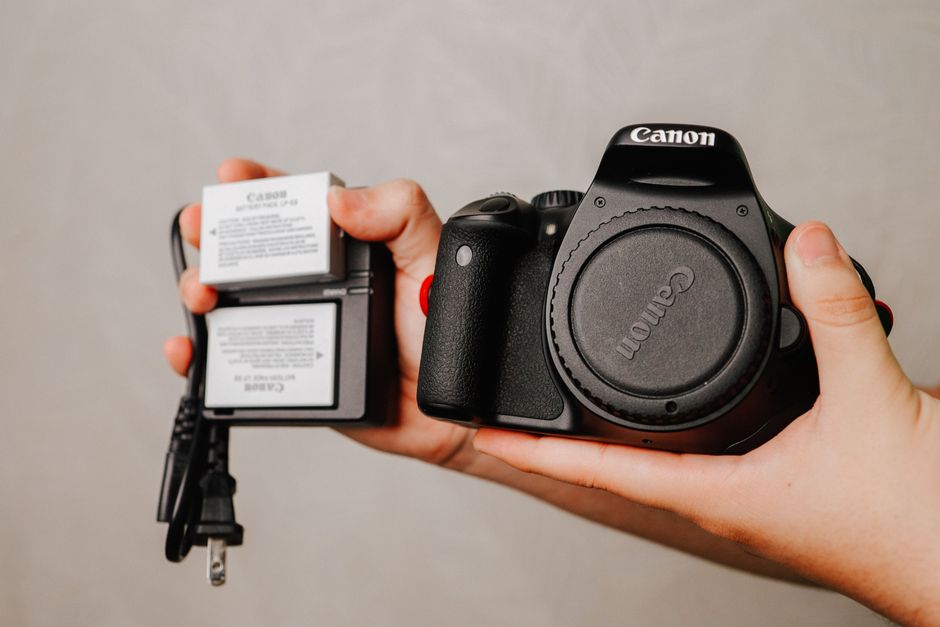
My winter vlogging uniform looks slightly ridiculous, but it works. I wear a base layer with interior chest pockets specifically designed for spare camera batteries. Your core body heat acts as a natural heater, keeping the lithium cells operating at peak efficiency until the exact moment I need to swap them out.
When the mercury drops below minus ten Fahrenheit, even body heat isn’t always enough for extended shoots. That’s when I deploy chemical hand warmers. But you have to be careful. Never, and I mean *never*, stick a burning-hot chemical warmer directly against a battery or a piece of electronics. You can overheat the casing, damage the internal circuitry, or worse.
Instead, create a buffer. Wrap your spare batteries in a microfiber cloth alongside a activated hand warmer, and store them in a small insulated pouch inside your jacket. This creates a regulated micro-climate that keeps your gear ready for action without risking thermal shock.
Managing Condensation When Stepping Back Inside
The cold air battle doesn’t end when you finish your outdoor segment. In fact, that’s usually when creators accidentally fry their expensive gear. If you take a freezing cold camera and walk straight into a warm, humid cabin or vehicle, condensation forms instantly. Not just on the outside of the lens—it forms *inside* the lens elements, on the sensor, and deep within the battery compartment.
I learned this lesson the expensive way back in Colorado when my favorite prime lens fogged up from the inside out. It took three days in a bag of dry rice (which you shouldn’t use anyway) to recover, and the autofocus motor never sounded quite right again.
Here is the fix: The Zip-Lock Quarantine. Before you step indoors, open your camera bag out in the cold air, drop your camera, lenses, and batteries into a heavy-duty ziplock bag, and seal it tight. Then, and only then, bring it inside. The air inside the bag is dry and cold. As the bag warms up to room temperature, any condensation forms on the *outside* of the plastic bag, not on your precious electronics. Leave it sealed for at least an hour.
Operational Tweaks for Extreme Environments
Battery management is half the battle. The other half is how you physically handle your equipment when your fingers start losing sensation. Standard touchscreens become completely unresponsive when you’re wearing thick gloves, and bare skin can literally stick to frozen aluminum camera bodies.
First, switch to manual focus whenever possible. Freezing temperatures play havoc with phase-detect autofocus systems as ice crystals float through the air or coat your lens element. Second, lower your monitor brightness. LCD screens are massive battery drains, and dropping the brightness from one hundred percent to fifty percent will noticeably extend your run times in the cold.
Finally, always carry a mechanical backup. A pocketknife, a roll of gaffer tape (which doesn’t stick well when frozen, so keep it in your pocket too), and a mechanical lens brush. For more severe conditions, check out guidelines from the National Weather Service cold weather safety portal before heading out into remote backcountry trails.
Frequently Asked Questions
Can I use dummy batteries with a power bank in winter?
Yes, external USB-C power banks are fantastic for winter vlogging because you can keep the heavy battery safely stashed inside your warm coat. However, make sure your power bank is rated for cold temperatures. Standard power banks can suffer from the exact same chemical slowdowns as camera batteries.
Should I turn my camera off between shots to save battery?
In warm weather, yes. In freezing weather, it’s a double-edged sword. Every time you turn the camera off, the internal components cool down rapidly. Powering it back up requires a surge of current that can shock a cold battery. On brutally cold days, sometimes it is better to leave the camera on in standby mode so it generates its own internal heat, provided you monitor your overall runtime.
How do I keep my microphone from picking up wind noise in a snowstorm?
Standard foam deadcats are useless in heavy winter wind or blowing snow. You need a high-density synthetic fur windjammer (often called a “dead wombat”). If snow gets packed into the fur, shake it out immediately before it melts and dampens your audio capsule.
Is it safe to charge cold batteries immediately after a shoot?
Never charge a freezing cold lithium-ion battery. Bringing a sub-zero battery straight to a rapid charger can cause lithium plating inside the cell, which permanently damages capacity and can create a fire hazard. Always let your batteries return to room temperature gradually before plugging them in.